Building a WebGL website in Cursor works like this: you describe the shot, not the code. Cursor writes the Three.js. Then you argue about physics.
Here is the whole loop, in the order it actually happens:
- Start with a reference, not an idea. A photo, a video breakdown, a real building. Something with a look you can point at.
- Write the brief in plain English with numbers in it. “Camera drops through the roof opening” is a wish. “Camera travels from (0, 60, 140) to (0, -10, 0) across scroll progress 0.08 to 0.13, FOV easing 50 → 70 → 55” is a spec Cursor can build.
- Let Cursor scaffold the project. Vite, Three.js, GSAP ScrollTrigger, split across scene.js, objects.js, animations.js, scroll.js, resize.js. Never one giant file.
- Build one scene per prompt. Ten scenes, ten prompts. Each one gets verified in a real browser before the next one starts.
- Make the AI prove it. “Build passes” is not “it looks right.” Ask for screenshots, frame captures, measured timings.
- Push to GitHub with a fine-grained token scoped to that one repo, Contents set to read and write.
- Connect the repo inside Vercel’s dashboard, not from the chat. Then every push deploys itself.
Total time across both WebGL websites: roughly 20 agent sessions, three of which were spent entirely on an authorisation error. More on that below, because it is the part nobody writes about.
The two WebGL websites
Two WebGL websites, built in Cursor’s cloud agents, roughly a month apart. Same tool, deliberately opposite problems. Both WebGL websites are live, so you can scroll them before reading how they were made — Ferrari World and AirAsia Seat 22A.
| Ferrari World Yas Island | AirAsia: Seat 22A | |
|---|---|---|
| What it is | A scroll-driven flythrough of the Abu Dhabi theme park, roof to ride to exit | An aircraft window you look out of, plus an airport apron you pick your destination from |
| Core mechanic | Ten scenes mapped to scroll progress 0 → 1 | Hand gestures and cloud-sweep destination swaps |
| Stack | Vite, Three.js, GSAP ScrollTrigger, vanilla JS | Vite + raw WebGL at the root; Next.js 14, React Three Fiber, Framer Motion, Zustand for the booking app |
| The hard part | Camera choreography — keeping ten camera moves from feeling like ten separate demos | Perception — MediaPipe hand tracking that fails silently on half the machines it runs on |
| Repos | vinitamathreja/yas-drive, vinita-byte/ferrari-world-project | One public repo, two apps: window app at root, AirAsia Unofficial in a subfolder |
| Live | Vercel, auto-deploying from main | seat-22a.vercel.app |
The interesting thing is that the two builds broke in completely different places. Ferrari World was a motion problem. AirAsia was a plumbing problem. However, Cursor was good at one of those immediately and had to be forced into the other.
Build 1: a Ferrari World WebGL website, or how to film a theme park you have never visited
The concept: a WebGL website built like a flythrough
Ferrari World on Yas Island has one of the most photographed roofs on earth — a vast red double-curved canopy shaped like a GT body, with a Prancing Horse the size of a tennis court on top and a circular opening punched through the middle.
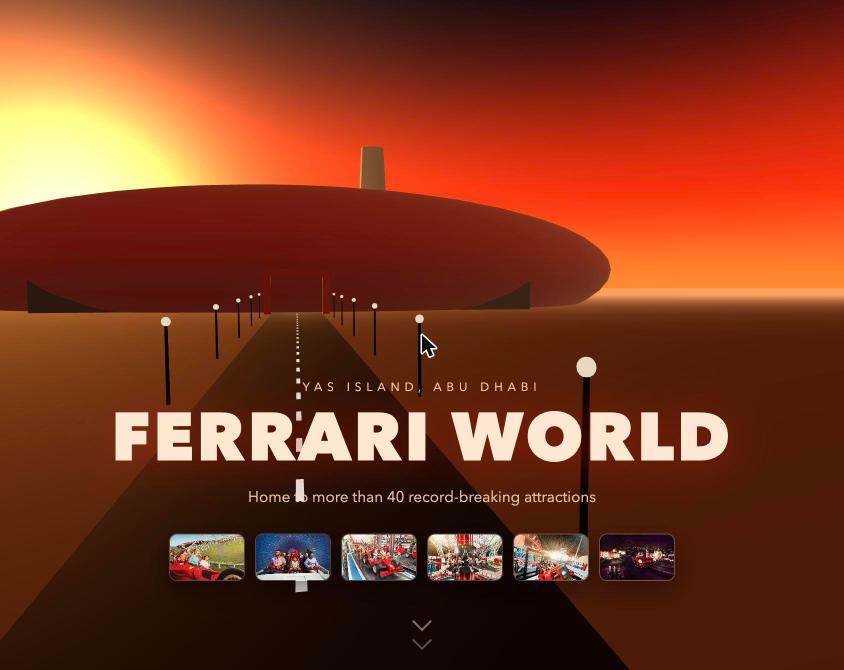
The vision was never “make a 3D model of a building.” For this WebGL website it was simpler: the roof is a door. You start above the clouds, you fall through the hole in the roof, and you do not come back out until the ride is over.
That single idea decided everything else. If the oculus is a door, it has to be a real hole in the geometry — a ring inset into the mesh — not a red circle painted on a flat roof. A decal would have collapsed the whole premise the moment the camera got close.
The references behind the AirAsia WebGL website that shaped this WebGL website
- The published architecture itself. The four-zone layout is real: Central Core and Adventure Zone, Racing Zone and Galleria, the Italian Maranello Village, and the Family Zone plazas. The build follows it rather than inventing a park.
- Photography of the interior. The prompts repeatedly point back at source photos — “the way the photo does,” “matching the reference’s layered depth.” The reference is what decided that the background should be busy but out of focus, and that the pendulum ride should sit beside the coaster loop so both read in one frame.
- Rosso Corsa, #CC0000. Hardcoded. The whole palette hangs off it.
- Visit Abu Dhabi’s own copy for the text layer: “Ferrari World,” “Yas Island, Abu Dhabi,” 40+ attractions.
The ten-beat edit of the WebGL website
As a result, the site is cut like a film, not laid out like a page. Scroll progress 0 to 1 is the timeline:
| Progress | The shot |
|---|---|
| 0 – 0.08 | Descent through cloud sprites toward the red starfish roof at sunset |
| 0.08 – 0.13 | The drop. FOV punches 50 → 70 → 55, radial motion blur, straight through the oculus ring |
| 0.13 – 0.28 | Lateral pan across the Scuderia hall — geodesic glass dome, red coaster on a Catmull-Rom spline |
| 0.24 – 0.33 | Camera drops to 1.4 units: child eye-height, dollying the kart circuit |
| 0.33 – 0.43 | Straight up the steel mast, lens flare through the dome lattice |
| 0.43 – 0.55 | Night falls. A slow hood-height glide past the Italian village reflected in still water |
| 0.55 – 0.70 | The camera snaps onto the coaster spline itself and rides a full loop |
| 0.66 – 0.78 | Outdoors on the launch trestle. FOV 80, the widest in the sequence, with velocity-scaled camera shake |
| 0.78 – 0.87 | Camera rolls 35° to bank with a yellow pendulum ride |
| 0.87 – 1.0 | Ribbed aquatic tunnel, easing to a stop on a PLAN YOUR VISIT sign, then the pin releases |
The detail that makes it feel alive rather than scrubbed: the coaster cars and the pendulum run on their own clock, independent of scroll. Stop scrolling and the park keeps moving. That is one line of instruction and it is the difference between a 3D scene and a place.
Build 2: an AirAsia WebGL website you look out of
The concept: a WebGL website you look out of
Every airline website looks the same: a fare search box over a stock photo of a beach. The premise here was the opposite — do not show people a picture of the destination, put them in seat 22A and let them look at it through the glass.
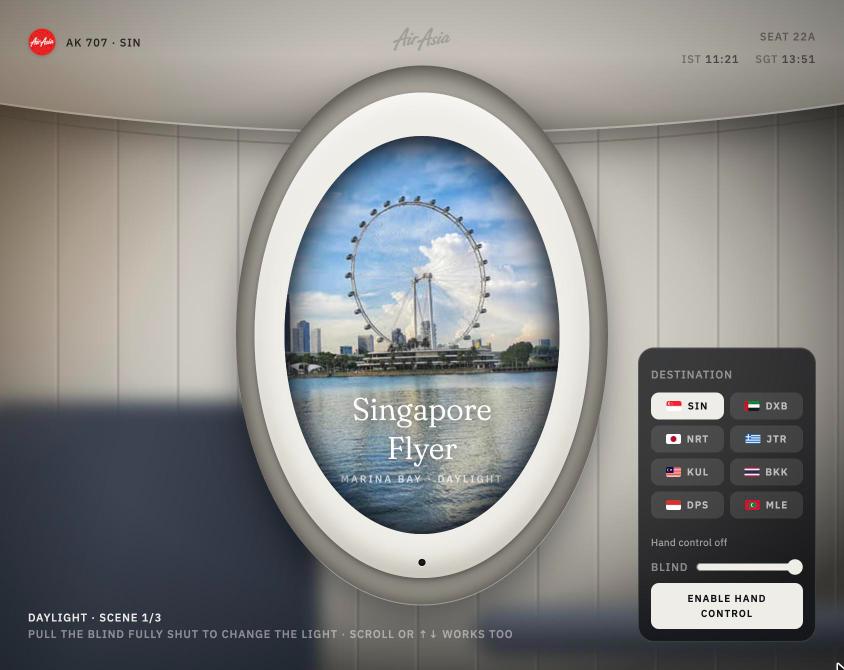
So the first version of this WebGL website was literally one window. A padded oval aircraft window, a pull-down beige blind, and the Singapore Flyer turning over Marina Bay beyond it. The page title was “Seat 22A · Singapore Flyer.” No nav bar. No hero. Just a seat.
The layer stack that makes this WebGL website work
In short, this is the structural trick worth stealing. The scene is not one 3D render. It is a sandwich:
- WebGL canvas — everything beyond the glass
- Glass glare and reflection gradient — DOM layer
- The blind — DOM layer, clipped to the window mask
- Inner bevel and inset shadow — DOM layer
- Outer cabin bezel and wall panel — DOM layer on top
Because the frame, blind and glare are DOM layers stacked above the canvas, anything rendered inside WebGL is automatically “outside” the aircraft. Swap the view, run a cloud sweep, change the whole destination — the window itself never moves. That one decision made every later feature nearly free.
The references
- A video breakdown of a hand-controlled airplane window UI — the original spark, and the source of the MediaPipe pinch-to-pull-the-blind interaction and the text-dissolve effect as the shade closes.
- Real landmark photography for the four destinations: Singapore Flyer, Burj Khalifa, Mount Fuji, Santorini.
- AirAsia’s actual brand red, #ED1C24, plus the real wordmark — which turned into its own small saga, below.
- A standard free-asset shortlist that is worth bookmarking for any WebGL build:
| Asset type | Where it came from |
|---|---|
| 3D models (.glb / .gltf) | Sketchfab (CC filter), Poly Pizza |
| HDRIs and skyboxes | Poly Haven |
| Stock imagery | Unsplash, Pexels |
| Micro-animations | LottieFiles |
Where the WebGL website went next
One window became four destinations with a cloud-sweep transition between them: cloud enters from the left, hits full white-out at 400ms, the photo is exchanged underneath at that exact moment, then the cloud clears off the right edge over 600ms while the incoming view eases from 1.08× down to 1×. It is a magician’s move — the swap happens while your view is covered.
Then the camera pulled all the way back. The apron scene puts six to ten AirAsia aircraft parked in an arc at dusk, each with a destination country’s flag on the tail fin instead of the standard livery. Hover and the aircraft brightens while the rest dim to 60%; a card floats up with the flag, the IATA code, the city, and flight duration from India. Click it, and the camera swings down, glides to a single cabin window near the wing, and the exterior fuselage resolves into the interior cabin wall. You end up back in seat 22A, looking at the place you just picked.
Around it sits a full AirAsia Unofficial concept app — fare search, a React Three Fiber 3D seat picker, Santan meals, baggage and insurance bundles, a rewards hub, Razorpay checkout. All of it priced through a single Zustand store so one subtotal pipeline handles the lot.
What to settle before your first WebGL website prompt
The temptation with an AI editor is to type “build me an immersive Ferrari World website” and see what falls out. That produces a demo. It does not produce a site. For example, the look you are aiming at has to come from somewhere real — the same reason AI-built work ends up looking generic when nobody picks a reference first.
What actually happened first, every time:
- Find the one sentence. “The roof is a door.” “The website is a window you look out of.” If a build cannot be said in one line, every prompt after that will drift.
- Find the reference and look at it properly. Not for inspiration — for specifics. Which way does the light fall? Is the background sharp or soft? What is in the foreground that gives it scale?
- Storyboard in beats, not in features. Ferrari World was planned as ten shots on a timeline before any code existed. That is why scene 7 can snap the camera onto the coaster spline built back in scene 3 — the pieces were designed to be reused.
- Decide the file structure up front. Entry file stays thin and acts as a table of contents. scene.js for renderer and camera. objects.js for geometry and lighting. animations.js for tweens. scroll.js for ScrollTrigger. resize.js for responsiveness. Prompting into named files is what stops an AI editor from quietly growing a 2,000-line main.js.
- Write the brief in numbers. This is the single highest-leverage habit. Compare:
A vague brief versus a measurable one
“Make the transition feel dramatic”
“Cloud sweeps in horizontally across the glass, left to right, building to full opacity over roughly 400ms. At peak cloud cover, the underlying image swaps. The cloud continues off the right edge over another 600ms. The new image starts at 1.08× scale, easing down to 1 as the cloud clears. The window frame, cabin light and reflections stay completely static throughout — only what is beyond the glass changes.”
The second one is 70 words and it got built correctly on the first attempt, including the detail that the frame must not move. The first one would have produced a cross-fade and a conversation.
The rule: if you can measure it, write the measurement. Milliseconds, FOV values, scroll progress ranges, hex codes, viewport widths, scale factors, how many pixels deep the bezel sits. Cursor is excellent at executing a spec and mediocre at guessing taste.
What the Cursor sessions on a WebGL website looked like
Not one chat. Four agent sessions across the two projects, each one running for 30 to 60 minutes at a stretch, with the agent working in its own cloud VM. Because long agent sessions get expensive quickly, it is worth knowing how to keep AI token usage down while coding before you start.
It scaffolds fast and sensibly. One prompt produced the whole Next.js 14 + React Three Fiber + Tailwind + Zustand setup for the AirAsia app, with the brand palette and data layer built before any UI. Dependencies pinned, routes generated, state store wired.
It takes staged briefs well. The Ferrari World build is ten sequential prompts, each one naming its files and its scroll range. The agent never lost the thread between scene 3 and scene 7, and it reused the coaster spline from the earlier scene rather than authoring a second camera path — because the prompt told it to inherit the loop geometry instead of hand-animating.
Where the agent pushes back, and where it stalls
It pushes back, usefully. Three times it did something that was not asked for and said so:
- The aircraft in the apron scene were showing flight numbers SQ 318, EK 517, JL 036 and A3 352 — Singapore Airlines, Emirates, JAL and Aegean. On an AirAsia-branded cabin. It swapped them to AK 707 and D7 306 / 532 / 918 (AK for short-haul, D7 for AirAsia X) and flagged the change as revertible.
- It added a README line stating the project is a fan-built concept, unaffiliated with AirAsia or Capital A, and that the flight numbers are invented — unprompted, because the repo was public and carrying a real trademark.
- Given a flat red logo block with white script baked in, it refused to just drop the PNG on a dark background. It derived two assets — one isolating the wordmark onto transparency by computing each pixel’s alpha from its whiteness, preserving the antialiasing — and rebuilt the header tile in CSS because the source artwork had rounded corners on one edge only and looked lopsided at small sizes.
Finally, it verifies when you make it. The best moments in these transcripts are measurements, not claims. On the cloud sweep it captured 98 frames and measured the glass in halves: the left side brightened at 288ms against 327ms on the right, and cleared at 673ms against 702ms — proving the cloud genuinely moved left to right rather than cross-fading. That is the standard to hold an AI editor to.
And it stalls. Both projects ended sessions on errors: “The agent stopped because of an unexpected error,” image caps hit on browser verification passes, hot-reload websockets dropping mid-test. None of it fatal, all of it normal. Budget for it.
Every mistake I made building a WebGL website in Cursor
None of these are Three.js mistakes. That is the point. A WebGL website fails in the plumbing long before it fails in the shaders. The 3D was the easy part; the surrounding reality is what ate the hours.
1. A one-word .gitignore entry silently deleted an asset
In fact, the file had a bare assets pattern. Git matches that at any depth — so it also matched src/assets, where the Singapore Flyer photo lived. The scene imported it, so it rendered perfectly on the machine that built it. A fresh clone built without the photo. Production never had it.
For example, this is the nastiest class of bug in AI-assisted building: everything works in the environment where the work happened, and the artifact you actually ship is hollow. It survived several sessions before anyone looked.
2. I believed the preview instead of the deployment
“The live site is further behind than it looked.” The dev server was serving a version that production had never seen. Repeatedly. Because the repo was not git-linked to Vercel, pushes did not deploy, so “pushed” and “live” drifted apart quietly for days.
3. I asked for a hand-tracking feature without asking for failure states
The MediaPipe pinch-to-pull-the-blind control looked completely dead. It was not dead — it had six separate defects, and almost all of them failed silently:
| The defect | What it looked like to a user |
|---|---|
| Grab used the hand’s absolute screen height, not relative movement | Pinching mid-screen slammed the blind halfway shut instantly |
| GPU-only inference, no CPU fallback | Nothing happened at all on a large share of machines |
| A rejected video.play() promise went unhandled | Stuck forever on “Asking for the camera…” with the camera light on |
| Preview video used display: none while idle | Browsers stop decoding hidden video, starving the tracker of frames |
| One pinch threshold for grab and release | The grab chattered on and off at the boundary, re-firing the snap |
| No per-stage status anywhere | Impossible to tell which of the five stages had failed |
4. I let dependencies float
Caret ranges (^) in package.json meant the deploy build could resolve different versions than the local one. Deploys were not reproducible until every version was pinned exactly.
5. I shipped full-size photography into the bundle
Destination photos went in at source resolution. For a window that displays a narrow portrait crop. The fix was pre-cropping to the region the window actually shows and compressing hard — a 512-wide crop at 34KB carried the towers and the waterline perfectly well.
Related, in reverse: one source image (Santorini) arrived at 201×251 pixels and had to be upscaled with a Lanczos filter and sharpening. It holds up, but it is visibly softer than the other three. Garbage in is still garbage out, even with good resampling.
6. I designed for my own screen
Of course, hover states everywhere, the destination card absolutely positioned on top of the window, percentage heights that mobile browser chrome slices in half. Retrofitting responsive behaviour at the end cost a full 30-minute session — reflowing to a flex column, swapping to dynamic viewport height units, replacing hover with a two-tap pattern detected by pointer: coarse, and enforcing 44×44px touch targets.
7. I blamed the code for a broken test
Then a five-scenario browser test failed. In fact, the code was fine. The dev server’s hot-reload websocket kept dropping, forcing full page reloads that wiped the Zustand store mid-click. Running the same test against a production build passed all five.
8. I pasted a Vercel token into the chat
It worked. It also put a credential that controls a Vercel account into a conversation transcript forever. The right move was Cursor Dashboard → Cloud Agents → Secrets, which injects it as an environment variable into every agent VM without it ever appearing in chat.
If you have done this: rotate the token. Revoke it in Vercel’s token settings and issue a fresh one through the secrets store.
How Cursor fixed each one — and the prompt that unlocked it
On a WebGL website the fixes matter less than the pattern. Here is what worked across both WebGL websites.
The prompt that changed the whole WebGL website build
“The hand control doesn’t seem to be working. Please look into the code and tell me exactly what is not working. Please also fix the problem and tell me exactly what you fixed, so that when I’m prompting the next build, I know what to add in instructions.”
In other words, three asks in one: diagnose, fix, and teach me the generalisable rule. That last clause is the one people leave out, and it is the one that compounds. It turned a bug report into a reusable principle:
Above all, never let a perception pipeline fail silently. Make every stage report its own state — camera → model load → frames arriving → hand detected → gesture recognised. Demand a CPU fallback for any GPU inference. And make gesture controls relative to the current value, never absolute.
That rule is now a line in every prompt involving a camera, a sensor, or a model running in the browser.
The rest of the WebGL website fixes
| Problem | What Cursor did |
|---|---|
| Teleporting blind | Rewrote the grab to move the blind by how far the hand travels from where the pinch started |
| Chattering grab | Separate enter and exit thresholds — hysteresis |
| Dead on some machines | GPU → CPU inference fallback |
| Stuck on “Asking for the camera…” | Handled the rejected video.play() promise, surfaced the error in the UI |
| Starved tracker | Replaced display: none with a collapsed layout so the browser keeps decoding frames |
| Missing asset in clean clone | Found the over-broad .gitignore pattern, fixed it, then cloned the public repo into a temp directory and rebuilt both apps from scratch to prove it |
| Unreproducible deploys | Pinned every dependency exactly, recorded the live URL in the README |
| Oversized images | Tested multiple crop and compression sizes, then standardised one |
| Deprecation warning | Replaced THREE.Clock with the timestamp the render loop already provides |
The verification habit worth copying
The most valuable thing in these transcripts is not code. It is proof:
- Frame-by-frame capture. The cloud sweep was photographed at 0, 150, 280, 400, 580, 650, 800 and 1000ms and the glass measured in halves across 98 frames.
- Clean-clone rebuilds. Not “it pushed” — clone it fresh, build it, confirm the 34,231-byte photo is in dist/.
- Live-URL checks, not localhost. Confirming all four destination photos return HTTP 200 on the deployed site, that both logo files load, that there are no console errors, and that the HUD reads what it should.
- Breakpoint sweeps. Testing at 320, 390, 430, 768 and 1024px wide plus landscape, confirming zero horizontal overflow.
Therefore, ask for the evidence, not the summary. “Build passes” is the AI equivalent of “works on my machine.”
Making a WebGL website fast enough to actually ship
A WebGL website that takes eight seconds to load is a WebGL website nobody sees. This was one explicit audit prompt across the whole Ferrari World scene graph, and it is reusable almost word for word:
1. Instance everything that repeats. Village buildings, rider figures, palm trees, scaffolding truss segments, crowd figures, cloud sprites — all converted to InstancedMesh. One draw call instead of hundreds.
2. Add distance-based LOD. The geodesic dome lattice and the coaster tube each sit on a THREE.LOD with high, mid and low meshes, so far geometry drops detail when the camera is in a different beat of the sequence.
3. Similarly, handle resize properly. Every ScrollTrigger refreshed on resize and orientation change, pixel ratio updated, and — critically — per-scene GSAP timelines killed and recreated rather than stacking duplicates. Stacked timelines are a classic silent performance leak.
4. Meanwhile, downgrade deliberately on mobile. Below 768px or on a coarse pointer: pixel ratio capped at 1.5, crowd / cloud / fish / speed-line counts halved, and the camera shake disabled entirely. Rattle reads worse on a small screen than it helps.
5. Respect prefers-reduced-motion. Not a checkbox — a genuine alternate experience. Reduced motion skips the scroll-driven camera completely and renders a static crossfade slideshow cycling fixed camera positions from each of the ten scenes. On the AirAsia build, the 1.2-second camera flight into the window becomes a 400ms crossfade straight to the destination.
6. Compress assets to the size they are displayed at. Not the size they arrived at.
That last one deserves repeating because it is the most common WebGL sin: people ship 3MB hero photographs into a 512-pixel-wide window.
How to connect Cursor to GitHub (the token part nobody explains)
First, the thing that confuses everyone about shipping a WebGL website from an agent: when a Cursor cloud agent builds something, the code does not start on GitHub. It lives in a Cursor Origin repository on the agent’s own VM, private by default. GitHub is a deliberate second step, and it needs a key.
Step 1: Get the code onto your own machine (optional but sane)
curl -fsSL https://cursor.com/origin/install.sh | sh
origin login
origin login also sets up your git credentials. If the command is not found afterwards, the binary is in a directory that is not on your PATH:
echo ‘export PATH=”$HOME/.local/bin:$PATH”‘ >> ~/.zshrc
Then clone, npm install, npm run dev. Full docs live at cursor.com/docs/origin/cli.
Step 2: Create an EMPTY GitHub repo yourself
The agent cannot do this part. You have to.
- Name it, choose Public or Private
- Leave “Initialize this repository” completely unchecked. No README. No .gitignore. No license.
That warning is not pedantry. An initialised repo creates a commit that conflicts with your existing history, and you end up resolving an awkward merge before you can push anything.
Step 3: Create a fine-grained personal access token
This is the key. In GitHub, go to Settings → Developer settings → Personal access tokens → Fine-grained tokens, and create one with exactly this scope:
| Setting | Value |
|---|---|
| Repository access | Only select repositories → the one repo you just made |
| Repository permissions → Contents | Read and write |
| Metadata | Read-only (GitHub adds this automatically) |
| Expiration | The shortest window that covers the work |
That is the minimum needed to push, and it is incapable of touching any of your other repositories. Do not use a classic token with repo scope — that grants access to everything you own, forever, to a process running in a cloud VM.
Step 4: Hand it over, then verify the push properly
Give the agent the token, let it push. Then do not take “pushed successfully” at face value — ask it to clone the repo fresh into a temp directory and build from scratch.
This is exactly how the missing-photo bug got caught. The push reported success every time. The clean clone did not build. Fifteen commits of history, a public repo, main as default branch — and an asset that existed nowhere but the original VM.
A note on where keys should live
Anything you paste into a chat is in that chat’s history permanently. For credentials you will reuse, put them in Cursor Dashboard → Cloud Agents → Secrets instead — they persist across sessions and get injected as environment variables into every new agent VM, without ever appearing in a transcript.
Deploying to Vercel from Cursor (and the 403 that ate three sessions)
This is the part that cost the most time, across both projects, and it had nothing to do with WebGL. In other words, the hard part of a WebGL website is rarely the graphics — it is the pipeline around them, which is also why the setup work before you start vibe coding matters more than it sounds.
What goes wrong when you deploy a WebGL website
The agent kept returning the same error:
Not authorized: Trying to access resource under scope “<team>”
The connection was signed in as the right account. The repo was pushed and current. The build was fine. The token only covered the personal user scope, and the projects lived under a team. And the scope choice is not something the agent can fix — it happens on your side, on Vercel’s authorisation screen, in a dropdown that is very easy to skim past.
The second failure mode: Vercel’s git-linked project path needs a connected Cursor Origin workspace on your account. Without one, linking returns 403 no matter how many times you re-authorise.
The fix, in order
- Find the “Reconnect to Vercel” button. It is not a link in the chat — it is a button in the Cursor interface, near the agent’s title bar where “Publish” normally sits. If you cannot see it, refresh the page or reopen the agent conversation. (I spent a full exchange asking “where is the Reconnect to Vercel clickable link” before working this out.)
- On Vercel’s authorisation screen, select the team, not just your personal account. This is the whole ballgame. Choosing personal scope is why every deployment call fails afterwards.
- Link the repository on Vercel’s side. Vercel dashboard → your project → Settings → Git. Once the repo is linked, every push to main deploys to production automatically and every other branch gets a preview URL. Until you do this, nothing auto-deploys and the agent has to hand-ship files through the API — which is exactly how a live site ends up weeks behind a repo.
- Deploy. A Vite static build needs no environment variables and no extra configuration. A successful run looks like: seat-22a · Vite · Node 22.x · region iad1 · build 18s · status READY.
Do you actually need a Vercel token?
Usually, no. Once the repo is git-linked, pushes deploy themselves. A token only matters if you want CLI workflows — logs, vercel inspect, manual deploys.
If you do need one:
- Create it at vercel.com/account/settings/tokens → Create Token → name it and scope it to the team. Vercel shows the value exactly once.
- Put it in .env.local as VERCEL_TOKEN. Never prefix it with VITE_. In a Vite project, anything starting with VITE_ is bundled into browser code and becomes publicly visible on your deployed site. That one prefix is the difference between a secret and a billboard.
- .env.local is already gitignored by the *.local pattern, so it stays off GitHub.
- But note: on a cloud agent, .env.local lives on a VM that is wiped when the session ends. For anything you want available to future sessions, use Cursor Dashboard → Cloud Agents → Secrets.
The 30-second version
Authorise Vercel with the team scope → link the GitHub repo in Vercel’s dashboard → push to main → done forever. Skip step two and you will be manually deploying for the rest of the project.
Eleven takeaways before you build a WebGL website in Cursor
- Direct the shot, do not describe the vibe. Milliseconds, FOV numbers, scroll progress ranges, hex codes, scale factors. “Dramatic” gets you a cross-fade; “400ms to full white-out, swap underneath, 600ms clear, 1.08× to 1×” gets you the thing you pictured.
- One sentence decides the build. “The roof is a door.” “The website is a window you look out of.” Everything downstream either serves that line or gets cut.
- Name your files in your prompts. objects.js for geometry, scroll.js for ScrollTrigger, animations.js for tweens. It keeps the AI from growing one unmaintainable file, and it means you can reason about the project a month later.
- Build in beats and reuse the pieces. Scene 7 riding the spline built in scene 3 is the whole argument for planning the sequence before writing any of it.
- Always ask for the generalisable rule. “Tell me what you fixed so I know what to put in my next prompt” is the highest-ROI sentence in this entire article.
- Demand evidence, not summaries. Frame captures, measured timings, clean-clone rebuilds, HTTP 200 checks against the live URL. “Build passes” means nothing.
Shipping a WebGL website: takeaways 7 to 11
- The deployed site is the only site. If it is not git-linked, “pushed” and “live” will silently diverge, and you will demo a month-old build to someone who matters.
- Scope every key to the smallest thing it can do. One repo, Contents read-write, short expiry. Put reusable secrets in a secrets store, never in a chat.
- Design for the coarse pointer from day one. Hover states and absolute overlays are a desktop luxury. Retrofitting mobile cost more than building for it would have.
- Reduced motion is a real build, not a flag. A ten-scene camera flight needs a genuine static alternative — and someone will need it.
- If you use a real brand, say what you are. Both of these builds carry a line stating they are independent fan concepts, unaffiliated and unendorsed, with invented flight numbers. A public repo with a real trademark in it deserves that sentence.
The honest summary of building a WebGL website in Cursor
Cursor did not make these sites. It removed the part where not knowing Three.js stops you from trying. That is the same pattern I hit across 30+ projects built as a non-coder.
What it could not do — and this is the actual job — was decide that the roof should be a door, that the frame must never move while the view behind it changes, or that an AirAsia cabin showing a Singapore Airlines flight number breaks the whole illusion. Taste is still yours. The AI is a very fast, very literal, occasionally brilliant crew.
Frequently asked questions
Can Cursor build a WebGL website?
Yes. Cursor can scaffold and build a complete WebGL website, in Three.js or raw WebGL, including GSAP ScrollTrigger camera choreography, shaders, instanced geometry and post-processing. The limit is not the code — it is how precisely you can specify the motion. Vague creative direction produces generic results; numeric specifications produce the shot you imagined.
Do I need to know Three.js to build a WebGL website in Cursor?
No, but you need to know the vocabulary. You do not have to write CatmullRomCurve3 or InstancedMesh yourself, but knowing that splines define paths, that instancing collapses repeated meshes into one draw call, and that LOD drops distant detail is what lets you ask for the right thing. Learn the concepts, let the AI handle the syntax.
Should I use Three.js or raw WebGL with Cursor?
Three.js for any WebGL website with meshes, lighting, raycasting or hover interaction — the apron scene with hoverable aircraft needed it. Raw WebGL is fine for a single full-screen shader effect, like a cloud sweep across a flat image plane. One of these builds used both, in different parts of the same repo.
Why does my Cursor agent fail to deploy to Vercel with a 403?
Almost always a scope problem. The Vercel authorisation was granted for your personal account while your projects live under a team. Reconnect Vercel from the button in the Cursor agent view and explicitly select the team on Vercel’s authorisation screen. Separately, git-linked deploys require a connected Cursor Origin workspace on the account.
What GitHub permissions does a Cursor agent need to push code?
For a WebGL website repo, a fine-grained personal access token with Repository access set to Only select repositories (just the one), and Repository permissions → Contents set to Read and write. Metadata read-only is added automatically. That is the complete minimum. Avoid classic tokens with repo scope.
Why is my Vercel site showing an old version?
Because the repository is not linked to the Vercel project. Without the link, pushes to main do not trigger deployments, and whatever was last hand-deployed stays live indefinitely. Fix it in Vercel dashboard → project → Settings → Git.
Can I put a Vercel token in a .env file in a Vite project?
Yes — in .env.local, named VERCEL_TOKEN, with no prefix. Never name it VITE_VERCEL_TOKEN. Vite bundles every VITE_-prefixed variable into the client code, which publishes your token on your own website.
Why does my WebGL website asset work locally but disappear in production?
Check .gitignore for over-broad patterns. A bare assets entry matches directories at any depth, including src/assets, so the file is never committed. It keeps working locally because it is still on disk. Test by cloning the repository into a fresh directory and building from scratch.
How do I make a WebGL website load fast?
Instance repeated geometry, add distance-based LOD, cap pixel ratio at 1.5 on mobile, halve particle and crowd counts on small screens, compress every image to the size it is actually displayed at, and build a genuine reduced-motion fallback. Fast load is a requirement, not a polish step.