
A RAG pipeline lets an AI model look up relevant examples from your own data before it answers, so its output reflects your material instead of generic guesses. This guide walks through how to build a RAG pipeline end to end in six beginner-friendly steps, using a real project: an app that writes ad copy in a chosen brand’s tone.
What Is a RAG Pipeline?
RAG stands for retrieval-augmented generation. In plain words, it is a three-part habit:
- Retrieve: search your own collection for the pieces most relevant to the user’s request.
- Augment: hand those pieces to the AI model alongside the request.
- Generate: let the model write its answer using that material as guidance.
Without RAG, a language model answers from what it learned during training. With RAG, it answers from what you show it at the moment of the question. That is why RAG suits tasks like brand-voice copywriting, internal knowledge search and customer support, where specifics matter more than general knowledge.
Why Beginners Should Start With RAG
- No model training required. You are not fine-tuning anything. You are organising data and connecting existing tools.
- Free tiers cover a learning project. Notebook environments, embedding APIs and hosted databases all offer starter plans, so you can build and test without a big budget.
- It teaches the core of modern AI apps. Scraping, embeddings, vector search and prompt assembly are the same building blocks used in far larger products.
- Results are easy to judge. If the retrieved examples are wrong, the output is wrong, so you can see exactly where to improve.
The Pipeline at a Glance: Six Steps From Scrape to Ship
The full loop runs from raw web data to a live app in six steps:
- Collect ad copy and creative images with a scraper extension, and save them to a CSV in Google Sheets.
- Extract structured text from each image using a vision model in a Kaggle notebook.
- Embed that text into vectors with Google’s Gemini embeddings API.
- Store the vectors in a Supabase Postgres database with the pgvector extension.
- Retrieve and generate: search the database for similar examples, add live web search, and have Claude write the final copy.
- Ship the whole thing behind a designed interface, deployed on Vercel.
The next two sections take each step in turn: what it does, why it matters and what to watch for.
Steps 1 to 3: Prepare Your Data
Step 1: Collect Your Raw Material
- What you do: Use a scraper browser extension to gather ad copy and creative images from the web, then export the results into a CSV through Google Sheets.
- Choose your sources carefully. Stick to material you are free to use, such as spec ads (concept ads made to showcase a creator’s skill), rather than licensed or commercially protected work.
- Keep it tidy. One row per ad, with columns for the image link, any visible copy and the brand name. Clean data now saves debugging later.
- Why a CSV: It is the simplest handoff format. Every notebook, script and spreadsheet tool can read it.
Step 2: Turn Images Into Text With a Vision Model
- What you do: Upload the CSV to a Kaggle notebook and run a vision model over each image. The model looks at the ad and writes a structured, readable description of it.
- Why this step exists: Search systems work on text. A picture of an ad cannot be searched by meaning until something describes it in words.
- What to ask the model for: Headline, body copy, tone of voice, visual style, target audience and brand. A consistent format across every entry makes retrieval far more reliable.
- Why Kaggle: Its notebooks are free to start with, which suits a learning project that processes a few hundred or a few thousand images.
Step 3: Convert Text Into Vectors With Embeddings
- What you do: Send each structured description through Google’s Gemini embeddings API. It returns a vector, which is a long list of numbers that acts as a fingerprint of the text’s meaning.
- Why it matters: Texts with similar meaning or style produce vectors that sit close together mathematically. That closeness is what lets the app find “ads that feel like this one” later.
- Keep one embedding model throughout. The vectors you store and the vectors you create for each search must come from the same model, or the comparison is meaningless.
- Embed the description, not the raw image. Because Step 2 already translated each ad into text, the embedding captures its tone and style in a form the database can search.
Steps 4 to 6: Retrieve, Generate and Ship
Step 4: Store Vectors in a Retrieval Layer
- What you do: Push the vectors, along with the original descriptions, into a Supabase Postgres database that has the pgvector extension enabled.
- What pgvector adds: The ability to search by semantic similarity instead of exact keywords. A search for “premium, understated, intellectual” can surface an ad that never uses those words.
- Store the useful extras. Keep the brand name, the original copy and a link to the source image in the same row, so retrieved results arrive ready to use.
- Why a regular database: Postgres is familiar, widely documented and free to start, so a beginner is not learning a niche tool on top of everything else.
Step 5: Retrieve, Add Context and Generate
- What happens when a user types a prompt: For a request like “Write copy for The Economist,” the app converts the prompt into a vector and asks the database for the closest matching ad examples.
- Add live context. The app also runs a live web search, so the copy can reflect what the brand is doing now, not only what the dataset captured.
- Assemble the prompt. The retrieved examples and the search findings are passed to Claude together with the user’s request.
- Generate in the brand’s tone. Claude writes the copy using those examples as a guide to voice, structure and rhythm.
- Retrieve a handful, not a flood. A small set of well-matched examples usually beats a large pile of loosely related ones.
Step 6: Wrap It in an Interface and Ship
- Design first. Mock up the interface in Figma so the flow is clear before any code is written.
- Deploy on Vercel. It publishes a web app from a code repository with very little setup, which keeps the focus on the pipeline rather than hosting.
- Keep the interface simple. One input box and one clear output is enough. The pipeline does the heavy lifting behind it.
- The result: A live product. In this project it is called Typo, and it covers the full loop from scraping to shipping.
Example of How To Create A RAG Pipeline For Beginners
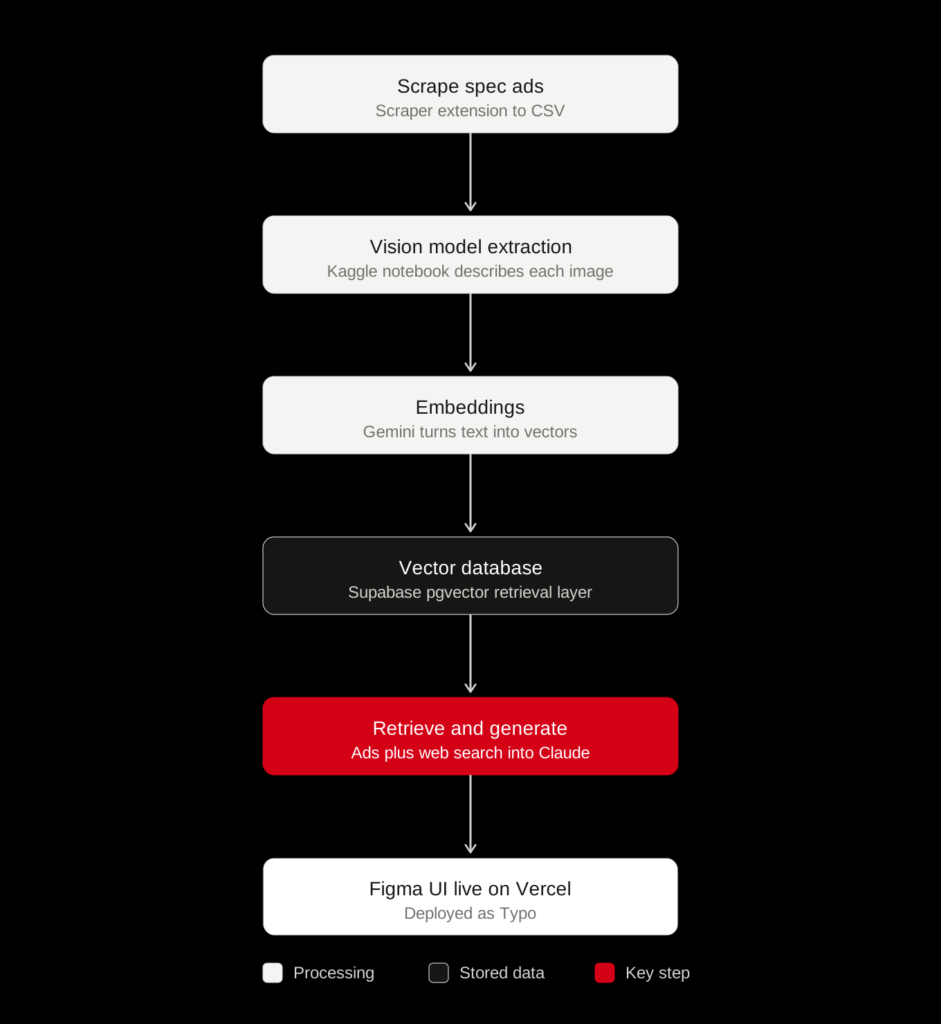
- You start by scraping ad copy and creative images from the web using a scraper extension, sticking to non-licensed, non-copywriting material like spec ads. That raw data lands in a CSV through Google Sheets.
- That CSV goes into a Kaggle notebook where a vision model runs the extraction step, looking at each image and turning it into structured, readable text describing the ad.
- That structured text gets passed through Google’s Gemini embeddings API, which converts each entry into a vector, a numerical fingerprint of its meaning, so visually or stylistically similar ads sit close together mathematically.
- Those vectors get pushed into Superbases PG Vector database, which is your retrieval layer. It lets the app search by semantic similarity instead of exact keywords.
- When a user types a prompt like “Write copy for The Economist,” the app searches that vector database for the closest matching ad examples, retrieves them, adds in live web search for current context, and feeds all of that to Claude, which generates the final copy in that brand’s tone.
- The whole thing is wrapped in your Figma-designed UI, live on Vercel as ‘Typo’.
Common Beginner Mistakes
- Messy or inconsistent data. If every entry is described in a different format, retrieval quality drops. Use one template for every description.
- Mixing embedding models. Stored vectors and search vectors must come from the same model.
- Using protected material. Build your dataset from content you have the right to use.
- Retrieving too much. Feeding the model dozens of examples dilutes the signal. Start with a few and adjust.
- Skipping evaluation. Test with real prompts, read what comes back, and fix the data when results feel off. Most RAG problems are data problems.
Frequently Asked Questions
Do I need to know how to code to build a RAG pipeline?
Basic Python helps for the notebook steps, but the pipeline is mostly about connecting existing services. Beginners can learn the code as they go.
What is the difference between RAG and fine-tuning?
Fine-tuning changes the model itself through additional training. RAG leaves the model unchanged and gives it relevant material at question time. RAG is faster, cheaper to start and easier to update, because you only change the data.
What is a vector database?
A vector database stores embeddings and finds the ones closest in meaning to a query. In this build, Postgres with the pgvector extension plays that role.
Why not just search by keywords?
Keyword search matches exact words. Semantic search matches meaning, so it finds relevant examples even when the wording differs.
Can this approach work beyond ad copy?
Yes. The same six steps apply to support articles, product catalogues, research notes and any other collection you want an AI model to draw on.
Key Takeaways
- A RAG pipeline retrieves relevant examples from your own data and gives them to an AI model before it writes.
- Six steps cover the whole loop: collect, extract, embed, store, retrieve and generate, then ship.
- Convert images to structured text first, because search and embeddings work on words.
- Keep one embedding model and one description template throughout.
- Start small, test with real prompts, and improve the data before touching anything else.