AI developers hit token limits all the time. This happens especially fast when you use Claude, Gemini, Gravity or Cursor every day. Fortunately, there is a fix. To reduce AI token usage, set up a strategy of skills and rules. It’s easier than it sounds.
This guide does two things. First, it shows you structured strategies that cut token use by 30%. Second, it shows you how to track your spending.
As a result, you can answer the question every client asks: “What does this really cost?”
What Are Tokens and Why They Matter?
Tokens are the currency of AI development. Every word in your prompt costs tokens. Similarly, every file reference and every context window adds to the bill. Traditional software has fixed compute costs. In contrast, AI development costs change with your usage.
A token is about 4 characters of text or code. Input tokens are what you send. Output tokens are what the AI generates. In general, input tokens cost about 1/5 as much as output tokens (see Anthropic’s API pricing). However, they still add up fast in long conversations.
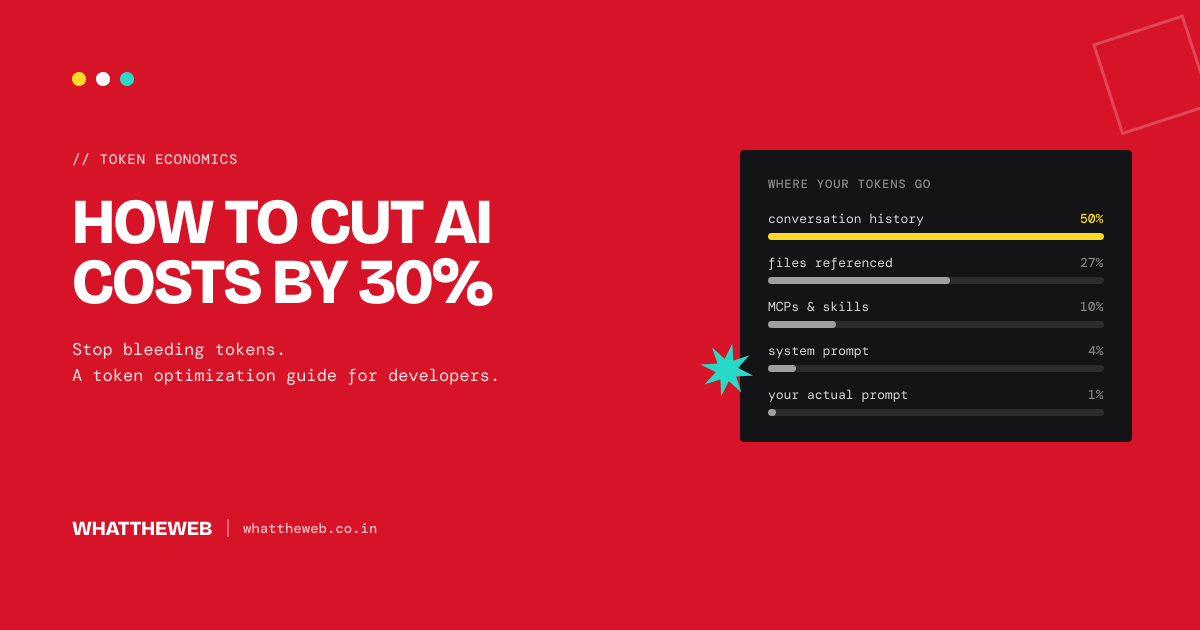
Here’s the problem. Most developers optimize the 30-token prompt. Meanwhile, they ignore the 35,600-token context.
| Component | Tokens | % of Total | Cost Impact |
| System prompt & tools | 1,200-2,000 | 3-5% | Baseline |
| Conversation history | 15,000-25,000 | 40-60% | Scales with thread length |
| Files referenced | 8,000-15,000 | 20-35% | Grows with project complexity |
| MCPs & skills | 2,000-5,000 | 5-15% | Often unnecessary |
| Actual prompt | 30-150 | <1% | Negligible |
How To Reduce AI Token Usage With Caching?
Your AI platform caches conversations. As a result, cache hits cut your costs sharply. Therefore, treat this as both a technical optimization and a semantic architecture principle.
How Cache Works:
- Cache reads cost 90% less than regular reads
- Cache window: 5 minutes on the free tier, 1 hour on Claude desktop
- A cache hit covers system prompts, tools, skills, memory files and all previous context
- One cache miss puts you back at full cost
RULE: Cache Management Protocol
# RULE: Cache Management Protocol

## Cache Activation
- Keep conversation moving — idle gaps break cache
- Run `/context` after installing tools to verify cache state
- One turn every 5 minutes keeps cache alive on free tier
- Stay within 1-hour window on paid subscriptions

## Cache Recovery
- If idle >5 min: cache breaks, next turn pays full cost
- Recovery: `/compact` invalidates cache but compresses history
- Use compact AFTER pauses, not mid-session
- Run `/context` post-compact to measure actual token savings

## Cache Optimization Decision Tree
- Task <15 minutes? Keep conversation moving, use cache.
- Task 15-60 minutes? Single session, cache beneficial.
- Task >60 minutes or multi-day? Start fresh session, accept full cost.
Write Decisions to Files (Non-Lossy Summarization)
The biggest token mistake? Relying on conversation compression. The problem is that compressed summaries lose detail. As a result, the AI has to ask its questions again.
Better Approach: Instead, extract decisions into persistent markdown files.
Implementation Rules
# RULE: File-Based Decision Architecture

## Mandatory File Structure
- `progress.md`: Current state, completed phases, next steps
- `design.md`: UI decisions, component architecture, design tokens
- `plan.md`: Technical architecture, stack choices, rationale
- `api.md`: Endpoint definitions, data models, error handling
- `deployment.md`: Release procedures, CI/CD, rollback steps

## File Reference Protocol
- In Claude.md, reference files conditionally:
  - "For UI questions, check design.md"
  - "When deploying, see deployment.md"
  - NOT "read design.md on every turn"

## Content Embedding Rules
- Never paste large files into chat
- Use `@filename` reference instead
- Pasted content = permanent context baggage

## Update Frequency
- Update files at phase completion
- Don't update mid-decision (draft in chat, finalize to file)
- Use version control (git) for file history
Write Specific Prompts to Reduce AI Token Usage
Vague prompts force the AI to guess, and guessing wastes tokens. So, be specific instead. For example, use exact entity names, file paths and line numbers.
Bad: “This function isn’t working. Can you fix it?”
Tokens wasted: the AI has to guess the function, the file and what “isn’t working” means.
Good: “The authentication flow in src/auth/jwt.ts is failing with a 401 error on line 45. The token validation logic is returning unauthorized for valid JWT tokens.”
Tokens saved: because the AI knows exactly what to fix, it skips the guesswork. For more on this, read our guide on how to structure a prompt.
Write Quality Code So the AI Uses Fewer Tokens
Code quality matters too. For instance, SonarSource analyzed 660 Claude code trials. Here’s what it found:
- Clean code uses 8% fewer tokens
- Fewer file rereads cut re-analysis by 34%
Track Costs to Reduce AI Token Usage
After all, you can’t reduce AI token usage if you don’t measure it.
Where to Find Your Data
Claude (Anthropic):
- Account settings → Billing → Usage dashboard
- Shows tokens by conversation, model and date range
- Lets you download usage reports
- Platform.openai.com → Usage → API usage
- Filters usage by model, org and month
- Gives you a cost breakdown
Other Platforms:
- Check account settings → billing/usage
- Most platforms show token counts and costs
Analysis Framework
Cost Analysis Questions to Ask
- Which projects consume 80% of your tokens?
- Focus your optimization effort there
- What’s your token-to-outcome ratio?
- Spending $200 per app feature? That’s your baseline.
- Spending $500? Time to optimize.
- Are conversations becoming more expensive over time?
- This points to growing context rot
- It’s a signal to modularize or start a fresh session
- Which phases burn tokens fastest?
- Planning runs long? Refine requirements earlier.
- Debugging gets expensive? Improve your testing.
- Architecture bleeds tokens? Plan better up front.
- Cost per feature vs. business value delivered?
- Some features justify 2x the token cost
- Some features burn tokens and return little
Turning Data Into Pricing (For Clients & Billing)
Collect 2-3 months of historical data. After that, you can quote with confidence.
Data-Backed Pricing Model:
Example client project: “Build AI chatbot”
Your historical data shows:
– Planning phase: 10K tokens (~$0.15)
– Architecture and setup: 25K tokens (~$0.35)
– Feature development: 50K tokens per feature (~$0.70)
– Testing and debugging: 30K tokens (~$0.40)
– Deployment and optimization: 15K tokens (~$0.20)
Total per feature: 130K tokens = ~$1.80
5 features = $9.00 cost + 40% margin = $12.60 to the client
Confidence level: High, because you base it on 12 similar projects.
In short, this beats guessing by 10x.
Creating Rules to Reduce AI Token Usage
These rules become your Claude.md and rules files. In addition, they pair well with the setup in things you will need before you start vibe coding that app.
Rule Set Template
markdown
# Token Optimization Rules (Add to Claude.md)

## Cache & Session Rules
- Keep conversations under 1 hour; start fresh after
- After any pause >5 minutes, assume cache breaks
- Run `/context` after installing tools to verify cache state
- Use `/compact` only after pauses, never mid-task

## File Architecture Rules
For [project name], maintain these files:
- progress.md: Current phase, completed work, blockers
- plan.md: Architecture decisions and stack rationale
- design.md: UI/UX decisions, design system references
- [domain].md: Domain-specific rules (api.md, deployment.md)

Reference conditionally:
- "When [task], check [file]"
- NOT "read [file] always"

## Prompt Specificity Rules
- Always include file paths: src/x.ts, not "the file"
- Always use line numbers: line 45, not "around there"
- Always name functions: getUserById(), not "the function"
- Always include error codes: 401, not "auth error"

## Code Quality Rules
- Run linters before asking AI to review: ESLint, Prettier, Black
- Keep files <500 lines; split into modules if larger
- Use meaningful variable names (saves AI re-analysis)
- Keep docstrings concise (don't bloat context)

## Testing Rules
- Build local tests (Playwright, Jest); don't ask for screenshot analysis
- When reporting bugs, point to exact lines and include error messages
- Share test output, not screenshots
- Avoids 3-5 round trips of back-and-forth

## Project Structure Rules
- [Module 1]: Load independently when needed
- [Module 2]: Load independently when needed
- Shared layer: [auth, config, utils] - loaded always
- Never load whole project at once
Rule Implementation Checklist
markdown
## Week 1: Foundation
- [ ] Create progress.md, plan.md, design.md in project root
- [ ] Document current architecture in plan.md
- [ ] List all design decisions in design.md
- [ ] Set up basic ESLint + Prettier config

## Week 2: Protocols
- [ ] Write Claude.md with file references
- [ ] Add prompt specificity rules to team guidelines
- [ ] Set up local Playwright tests for critical flows
- [ ] Record first 3 days of baseline token usage

## Week 3: Measurement
- [ ] Measure token cost per feature
- [ ] Identify highest-cost features
- [ ] Apply optimizations to one high-cost feature
- [ ] Compare token usage before/after

## Week 4: Iteration
- [ ] Double down on optimizations that worked
- [ ] Adjust rules based on what stuck
- [ ] Build 2-4 week historical baseline
- [ ] Calculate token cost per feature type
FAQ
Q: Can I apply these rules to projects already in progress?
A: Yes. Start with file-based architecture for new features. Create files like progress.md and plan.md. Modularize existing code step by step. Writing to files and local testing deliver the biggest wins.
Q: Which optimization does the most to reduce AI token usage?
A: We looked at 660+ trials. Modularizing large projects saves the most (40-60%). Writing decisions to files comes next (15-20%). Better code quality follows (8%).
Q: How long before I see cost reduction?
A: In Week 1, you set a baseline. In Week 2, you put rules in place. By Weeks 3-4, you’ll see a measurable drop, usually 20-30%. Full optimization takes 6-8 weeks.
Q: Does token optimization affect output quality?
A: No. Clean code, specific prompts and proper files improve output and reduce tokens. It’s a pure efficiency gain.
Q: Should I optimize every project or just big ones?
A: Focus on projects above 100K tokens/month. They give you high ROI. Small projects under 20K/month won’t justify the effort. Start with your 80/20 cost hogs.
Q: How do I measure if an optimization actually worked?
A: Run the same task with and without the optimization. Use a feature, debug session or planning phase. Compare the token counts. Document the difference. If you see a 15%+ drop, keep it.