AI video has crossed the “wow, that’s real” line. The problem is everyone else has crossed it too — which means the uncanny, over-smooth, suspiciously-perfect clip is now the default, not the exception. The clips that actually stop a thumb are the ones that feel a little human: a character who hesitates, a voice that breathes, a face that says one thing while the mouth says another. That’s not luck. It’s prompting. Here’s how to write AI video prompts that earn the second look.
Last updated: October 1, 2026 · Filed under Prompt Engineering · Covers Google Veo 3.1, Sora 2, Kling, Runway Gen-4 and ElevenLabs v3.
Quick answer: how do you write AI video prompts that look human?
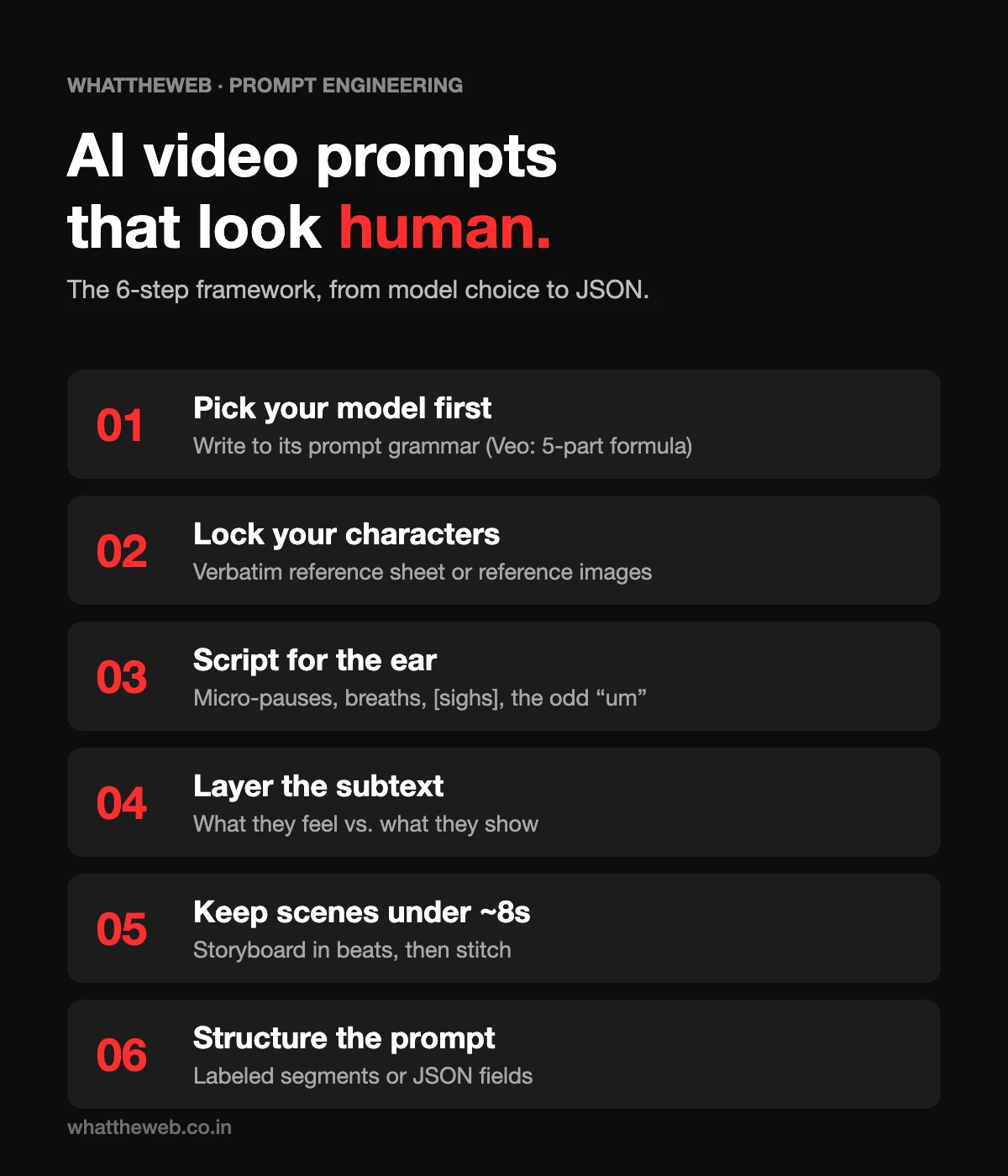
To write AI video prompts that look and sound human in 2026: pick your model before you write a word, lock your characters first with a reference sheet or reference images, script dialogue in spoken rhythm (with micro-pauses, audible breaths, and the occasional “um”), layer in emotional subtext, keep every scene under ~8 seconds, and structure the whole thing as a clean, segmented prompt. The single biggest mistake is writing for the page instead of for the ear and the eye.
- Pick your model first and write to its prompt grammar.
- Lock your characters with a verbatim reference sheet or reference images.
- Script dialogue for the ear — micro-pauses, breaths, the odd “um.”
- Layer emotional subtext — what a character feels vs. what they show.
- Keep each scene under ~8 seconds and stitch the beats together.
- Structure the final prompt in labeled segments (or JSON).
Now the detail. Jump to any step:
- Choose your AI video model first
- Build consistent characters
- Make AI dialogue sound human
- Add emotion through subtext
- Keep scenes under 8 seconds
- Convert your prompt to JSON
- Copy-paste prompt template
- Checklist · FAQ
1. Choose your AI video model before you write the prompt
A prompt that sings on one model can flop on another, because each model was trained to “listen” differently. So this is decision zero, not an afterthought.
The current landscape worth knowing:
- Google Veo 3.1 — the cinematic heavyweight, with synchronized native audio, dialogue, and reference-image character control. Clips come in 4, 6, or 8-second lengths at 720p/1080p.
- Kling, Sora 2, Seedance, Runway Gen-4 — each has its own strengths in motion realism, fidelity, or stylization. In fact, many ad teams now mix models in one project: fast iteration on one, hero shots on another, character scenes on a third (AdCreate describes exactly this multi-model workflow).
The practical takeaway: read the prompting guide for your model and write to its grammar. Veo, for instance, rewards a structured five-part formula — [Cinematography] + [Subject] + [Action] + [Context] + [Style & Ambiance] — per Google’s own guidance. On the other hand, other models prefer one clean idea per shot (Leonardo.Ai’s guide is good on this).
2. Build consistent characters first — then the story
If you’re writing AI video prompts for a series of clips and you want them to feel like one world, set your stage before you write a single scene. Indeed, out-of-place characters are the fastest way to break the illusion.
Two ways to lock consistency:
Option A: Character reference sheets
Write an exact, almost obsessively specific physical description and reuse it verbatim in every prompt. For example: same hair, same jacket, same glasses, same mannerisms — copied and pasted, only the action changes. Replicate’s Veo 3 guide makes the point bluntly: the more unique and specific the description, the better the model holds the character across separate generations. Dr. Wafae Bakkali’s Google Cloud guide adds a pro move — paste the unchanged description every time, and use Gemini as a scene generator to spin variations off that locked profile.
Option B: Reference images (the “Ingredients to Video” route)
This is the feature the AI crowd keeps gesturing at. In Veo 3.1 / Google Flow, you generate your “ingredients” — character, object, setting — as reference images (often with Gemini 2.5 Flash Image, a.k.a. Nano Banana), then compose scenes from them so the look stays consistent across shots, as Google documents here. Vertex AI’s subject-image workflow supports up to three reference images of a single person, character, or product. In other words, think of it as chain-prompting: because the asset already exists, the visual thread never breaks.
Set the stage, design the characters, then storyline it — by hand if you’re a good storyteller, or with AI as a co-writer if you’re not.
3. Kill the robot: how to make AI dialogue sound human
Here’s the mindset shift most people miss when writing AI video prompts: you are not writing narration. You are writing a performance. After all, narrative-structured, perfectly-punctuated dialogue is exactly what makes audio sound robotic — because real humans don’t talk in clean paragraphs.
Instead, the fix is to direct the delivery, not just the words. Four techniques that break the robotic pattern:
Add micro-pauses
Tell the model exactly where to hesitate. “…with a long, thoughtful pause after he says ‘okay,’” or “stuttering slightly, like he’s been caught off guard.” Most voice models read pauses through punctuation — ellipses (…) create natural hesitation, and tools like ElevenLabs and Deepgram use punctuation and filler words to control rhythm.
Define the breath
By contrast, robotic audio has no inhalation. Ask for a sharp, audible intake of breath before the line, or a soft, trailing exhale at the end of the sentence. In ElevenLabs v3 you can do this literally with audio tags like [sighs] and [exhales] (tag reference here).
Add non-lexical elements
Similarly, humans fill speech with non-words. Drop in a small genuine chuckle mid-sentence, a throat-clear at the start, a half-swallowed “um.” ElevenLabs v3 supports [laughs], [clears throat], [hesitates], and [stammers] as performance cues, per their docs — and competing models like MiniMax now model “um,” “uh,” and “ah” natively too.
Describe the texture, not the voice
Don’t write “a human voice.” Describe the physics of the sound: “slightly muffled, as if the character is speaking from behind a closed door.” You’re directing acoustics, and the model has far more to grab onto.
Quick reference — the four techniques at a glance:
| Technique | What to add to your prompt | Example cue |
|---|---|---|
| Micro-pauses | Exactly where the character hesitates; ellipses for natural breaks | “Okay… fine.” / “a long, thoughtful pause after ‘okay’” |
| Breath | An audible inhale before the line or a trailing exhale after it | [sighs], [exhales] |
| Non-lexical sounds | Chuckles, throat-clears, filler words | [laughs], [clears throat], “um” |
| Sound texture | The acoustics of the voice, not “a human voice” | “slightly muffled, as if behind a closed door” |
The throughline: when you write dialogue, write like you’re in the scene — not like you’re reading the script aloud at a meeting.
4. Add emotion through subtext
This is the advanced move in AI video prompts, and it’s where AI video stops feeling generated.
Subtext is the gap between what a character feels and what they show. A person says “I’m so happy for you” while their face does something else entirely. In fact, we read that gap every single day — it’s the texture of being human.
So don’t just label the emotion. Build the contradiction into the prompt: the cheerful words, the tight smile, the sigh before the sentence, the hesitation that betrays the line. ElevenLabs’ emotional-context guide shows how layered tags like [tired], [resigned], or [quietly] mid-line create exactly this kind of arc. Above all, master the description of human emotion — precisely, not vaguely — and the model will perform it.
5. Keep every scene under ~8 seconds
A hard constraint to design your AI video prompts around: most models still generate in short bursts — Veo 3.1 tops out around 8 seconds per clip, and creators broadly treat ~8 seconds as the sweet spot (Replicate notes that dialogue should be sayable in roughly that window).
Practical consequences:
- Write dialogue that fits. Cram too many words in and the character speed-talks; too few and you get awkward silence or AI gibberish.
- Storyboard in beats. Instead, think in 8-second chunks and stitch them, rather than imagining one long unbroken shot. Veo even lets you assign actions to timed segments ([00:00–00:02], [00:02–00:04]…) inside a single prompt — a clean way to direct multi-shot scenes (Google’s guide walks through this).
One small but mighty syntax tip from the Google Cloud community guide: to make a line spoken rather than printed as on-screen text, put a colon after the speaker’s action — The detective leans in: “We don’t have much time.” — and add (no subtitles) if your model tends to caption things.
6. Convert your AI video prompts to JSON (the structured-prompt trick)
Here’s a technique the AI-video community swears by: take your finished prompt and restructure it as JSON before you feed it in. That’s because generative video models tend to follow a clean, segmented blueprint more faithfully than a wall of prose, because every element gets its own labeled slot. (New to structured prompting? Start with our guide on how to structure a prompt.)
A JSON prompt might look like:
{
  "shot": "slow 180° arc, shallow depth of field",
  "subject": "weathered fisherman, grey knit cap, salt-and-pepper beard",
  "action": "grips the railing, gazes at the churning sea",
  "setting": "fishing trawler, overcast dawn",
  "lighting": "soft, cool, diffused",
  "mood": "melancholic, contemplative",
  "audio": "wind, distant gulls, low ambient hum",
  "dialogue": "The sea, she takes what she wants. [exhales]"
}
Multiple guides document why this works: it forces clarity, enables reusability (swap one field without rewriting), and improves consistency across shots — see ImagineArt’s JSON guide and this deep-dive on why JSON beats generic prompts. You can convert a plain script to JSON by hand or with a free converter tool.
One honest caveat worth knowing (the part most JSON evangelists skip): Google’s own official Veo guidance doesn’t demand strict JSON. Instead, its house format is structured natural-language prose built on the five-part formula, plus optional timestamped segments. So JSON is a powerful, community-proven habit — especially for repeatable, multi-scene production — but it’s a tool, not a law. In short, test both against your model and keep whatever wins.
Copy-paste template for AI video prompts
[Camera/Shot]: medium close-up, slow push-in, shallow depth of field
[Subject]: <paste your locked character description, verbatim, every time>
[Action]: <one clear action that fits in ~8 seconds>
[Setting/Context]: <location, time of day, weather>
[Lighting & Mood]: <source, direction, softness, color, emotional tone>
[Audio]: <ambient sound + acoustic texture>
[Dialogue]: The character pauses, then — softly: "your line here." [sighs]
(no subtitles)
The human-prompting checklist for AI video prompts
- [ ] Chose the model and read its prompting guide first
- [ ] Locked characters with a verbatim reference sheet and/or reference images
- [ ] Wrote dialogue in spoken rhythm, not paragraph form
- [ ] Marked micro-pauses, breaths, and at least one non-lexical filler
- [ ] Described sound texture, not just “a human voice”
- [ ] Built in emotional subtext (felt vs. shown)
- [ ] Kept every scene sayable in ~8 seconds
- [ ] Structured the final prompt cleanly (segmented or JSON)
FAQ: AI video prompting
Why does my AI video sound robotic even with a good model?
Almost always the script, not the model. It’s written to be read, not spoken — long sentences, no pauses, no breath room, no emotional cues. Therefore, shorten the lines, add pauses where a real person would breathe, and mark the emphasis (more here).
How do I keep the same character across multiple clips?
Reuse an identical, hyper-specific character description in every prompt, and/or use reference images (Veo 3.1’s “Ingredients to Video”). In general, vague descriptions drift; specific ones hold (Replicate guide).
Is JSON prompting actually necessary?
No — but it helps for consistency and repeatable production. Google’s official format is structured prose, so treat JSON as a high-value option to test, not a requirement (Google’s guide).
How long can an AI video clip be?
Most models still generate in short bursts — Veo 3.1 offers 4, 6, or 8-second clips. Plan your storytelling in ~8-second beats and stitch them.
How do I stop an AI video model from adding subtitles?
Put a colon after the speaker’s action so the line is read as speech — The detective leans in: "We don't have much time." — and add (no subtitles) at the end of the prompt if your model still captions things.
What is a JSON prompt for AI video?
A JSON prompt rewrites your scene as labeled fields — shot, subject, action, setting, lighting, mood, audio, dialogue — so the model gets a clean, segmented blueprint instead of a wall of prose. It also makes prompts reusable: swap one field without rewriting the rest.
Which AI video model is best for realistic dialogue?
There’s no single winner, and many teams mix models. Google Veo 3.1 is a common pick for dialogue scenes because it generates synchronized native audio and supports reference-image character control; Kling, Sora 2, Seedance, and Runway Gen-4 each have their own strengths in motion realism, fidelity, or stylization.
Related on WhatTheWeb: How to structure a prompt · Prompting for AI is changing
Sources & further reading
- Google Cloud — Ultimate prompting guide for Veo 3.1
- Replicate — How to prompt Veo 3 for the best results
- Google Cloud Community (Dr. Wafae Bakkali) — Veo 3: A Detailed Prompting Guide
- Leonardo.Ai — Mastering Prompts for Veo 3
- ElevenLabs — Eleven v3 Audio Tags · Emotional context in speech · Best practices
- Deepgram — Text-to-Speech Prompting
- ImagineArt — JSON Prompting Guide for Veo 3
- ArchitJN — Veo 3 JSON Prompt Format That Beats Generic Prompts
- AdCreate — Veo 3.1 Prompting Guide